
Friday, September 30, 2011
Ubuntu Application Launcher: GNOME Pie
There are many application launchers from a third party, such as Synapse, Launchy, and Do. Looks like the list will grow with the inclusion of another launcher app, GNOME Pie.
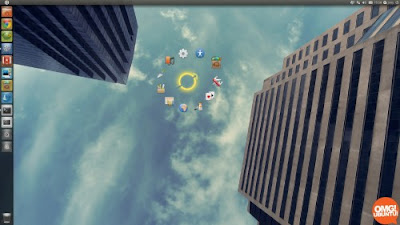 GNOME Pie is a Ubuntu application launcher that works based on the combination of a keyboard (fully customizable). You press a keyboard combination and a “Pie" will appear (circular animation launcher). Click one app’s shortcut within the Pie to launch an app. These shortcuts are named "Slices".

Thursday, September 29, 2011
Windows 8 USB Installation
Lately we often heard of Windows 8. Some people who curious try to install it on their virtual box machine. But for some people who want to feel Windows 8 in real performance, they directly install Windows 8 on their computer without virtualization. But there is a slight problem for notebook users who are not equipped with DVD drives.
Fortunately, you can do Windows 8 USB installation. In this way, you can use your USB stick as the installation media. Here are the steps:
Fortunately, you can do Windows 8 USB installation. In this way, you can use your USB stick as the installation media. Here are the steps:
- Make sure your notebook supports booting from USB, you can see it through the BIOS on the boot menu configuration. Find the entry that says Boot, Boot Order, Boot Sequence, or anything about the “boot" and make sure that USB has the first priority on the system.
TuneUp Utilities 2010 Product Key
Hello techno46 readers, through this post I will share you free TuneUp Utilities 2010 product key. Previously, let's discuss what TuneUp Utilities is. It is one of the popular software that is made to keep our computer in top performance. First made in 1997 and created to help Windows systems users for both beginners and amateurs.
 Follow these steps to get free TuneUp Utilities 2010 product key:

- Visit http://www.tuneup-software.co.uk/promo/cs0411.
- Enter your valid email address, fill in the captcha code, and re-enter your valid email address.
Wednesday, September 28, 2011
Youtube to mp3 in Easy Way
If you want to change from Youtube to mp3, then I recommend you to use utube2mp3. It will help you to extract mp3 files from Youtube. Oops, I forgot. This small utility works in Ubuntu environment.
Firstly, you should download the utube2mp3 binary, make it executable, and create shortcuts on the Desktop (optional). Go to Terminal and type the following command:
Firstly, you should download the utube2mp3 binary, make it executable, and create shortcuts on the Desktop (optional). Go to Terminal and type the following command:
Install OpenShift Express on Windows 7
Some times ago, we have discussed about how to install Linux app on Windows using Cygwin. For now, we are talking about how to install OpenShift Express on Windows 7. To achieve our goals, we still use the same helper programs, Cygwin.
Follow these instructions:
Follow these instructions:
Subscribe to:
Posts (Atom)